
Webhook For Contact Form 7 Support
Overview
Webhook For Contact Form 7 is a WordPress plugin that extends Contact Form 7 by allowing you to send form submissions to any webhook endpoint. This enables easy integration with external services, automation tools, and custom workflows.
Features
- Send Contact Form 7 submissions to any webhook URL
- Supports custom headers and payloads
- Easy setup and configuration
- Compatible with popular automation platforms
Installation
- Download the plugin from the WordPress Plugin Directory or from your repository.
- Upload
cf7-webhook.phpto your WordPress plugins directory. - Activate the plugin via the WordPress admin dashboard.
Configuration
- Go to Contact Form 7 settings.
- Add your webhook URL in the provided field.
- Optionally configure custom headers and payload format.
Step-by-step Visual Guide
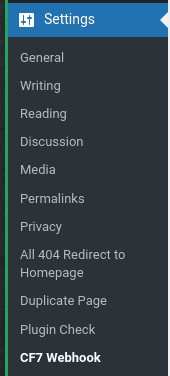
Navigate to Settings > CF7 Webhook in your WordPress dashboard.
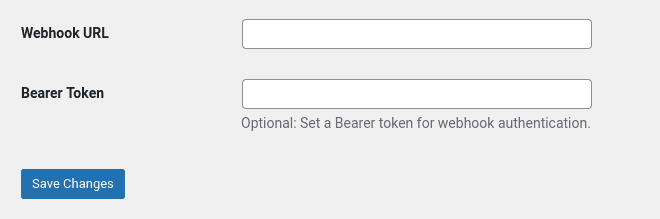
Enter your Webhook URL and optional Bearer Token, then click Save Changes.
Troubleshooting
- Ensure your webhook URL is correct and accessible.
- Check for conflicts with other plugins.
- Review WordPress logs for errors.
Frequently Asked Questions
Q: Can I send data to multiple webhooks?
A: Currently, the plugin supports one webhook per form. For multiple endpoints, use automation tools or custom code.
A: Currently, the plugin supports one webhook per form. For multiple endpoints, use automation tools or custom code.
Q: Is the plugin secure?
A: Yes, data is sent securely. Always use HTTPS endpoints for webhooks.
A: Yes, data is sent securely. Always use HTTPS endpoints for webhooks.
Contact & Support
If you need help or have feature requests, please contact us at support@wods.agency or open an issue on our GitHub repository.